ContactSign inSign up
Contact
Storybook AI & Agents Vitest Playwright Cypress

Cloud visual testing for Vitest

Catch visual bugs with the Vitest component tests you already have. Chromatic supplies the browsers, stores the snapshots, and returns fast, reliable results at any scale.

Get started for freeBook a demo
Vitest iconMade by a Vitest core maintainer
apollo logo
toyota logo
indeed logo
twilio logo
nespresso logo
peloton logo
apollo logo
toyota logo
indeed logo
twilio logo
nespresso logo
peloton logo
apollo logo
toyota logo
indeed logo
twilio logo
nespresso logo
peloton logo
apollo logo
toyota logo
indeed logo
twilio logo
nespresso logo
peloton logo
apollo logo
toyota logo
indeed logo
twilio logo
nespresso logo
peloton logo

Use the tests you already have

Vitest component tests exercise the states and interactions that matter. Chromatic checks how those same scenarios look to catch visual regressions that assertions miss. You get broader coverage without rewriting your test suite.
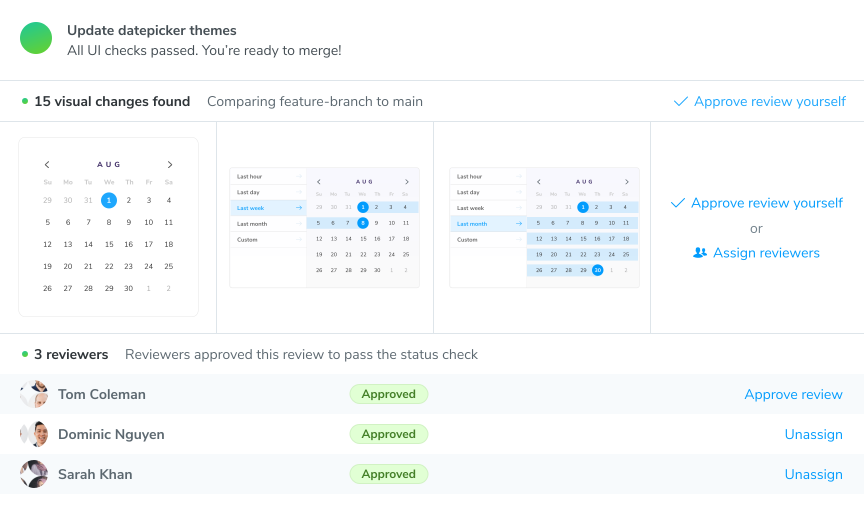
Visual changes detected and reviewed
Capture the final state by default
Chromatic captures the rendered UI when each included test finishes. No toMatchScreenshot call required.
Start small and grow coverage
Use Vitest tags to select an initial set of tests, then add more over time.
Capture more than the final state
Use takeSnapshot to test loading screens, open menus, and other intermediate states before the test moves on.
“Chromatic has been indispensable since the day we added it. It has really increased the confidence and speed with which we merge changes 💯”
Siddharth Kshetrapal
Design systems engineer
GitHub

Scale coverage without more CI workers

Chromatic provides standardized cloud browsers with built-in stabilization and unlimited parallelization. Get fast, flake-free results across millions of test runs.


Browsers included
Each browser runs in a consistent, maintained environment. Test Chrome, Firefox, Safari, and Edge in one click.
Parallel by default
Chromatic runs all browsers and viewports concurrently on our infrastructure. No extra CI workers, or sharding overhead.
Stop render flake at the source
Chromatic stabilizes rendering inside the browser itself by tracking interactivity, network, asset loading, and burst capture rendering.

Snapshot storage for millions of tests

Chromatic stores every snapshot in the cloud and associates it with the relevant Git commit. This keeps your repo tidy as you add more coverage.

No reference images to commit
Snapshots live in Chromatic instead of bloating your repository. This avoids slow checkouts and fussing with Git LFS every time your tests change.
Baselines follow branches
Chromatic tracks test baselines using Git history. New branches inherit the right baseline, and accepted changes carry through merges. No juggling image directories.
Store more than the screenshot
Chromatic captures the rendered UI elements and assets not just the pixels. This helps you debug precisely why code, styles, assets render the way they do .
“Setting up a first-class, cross-discipline contributor experience used to take my teams months. Today, I can build it myself in a few clicks thanks to Chromatic!”

Kaelig Deloumeau-Prigent
Principal software engineer
Netlify

Spot the visual differences

Catch changes to color, position, size, and layout before they ship. Chromatic brings the baseline, new snapshot, and pixel diff into the browser so regressions stand out.

See changes from every angle
Switch between 1up, 2up, and Diff views to compare snapshots side by side, overlay them, or isolate the pixels that moved. Use strobe, focus, and zoom tools to surface subtle differences.
Tune comparison sensitivity
Chromatic includes a default comparison threshold and ignores anti-aliased pixels. Adjust sensitivity per project or test when your UI needs a stricter or looser comparison.
Ignore dynamic content
Mask changing pixels from videos, timestamps, or user data. Chromatic still compares the element’s size and position, so layout shifts remain visible.
“Visual diffs make changes apparent and unmistakable... Chromatic has been extremely useful and confidence-inspiring.”
Lauren Eastridge
Lauren Eastridge
Director of open source
Formidable

Review changes and update baselines

Chromatic turns each Vitest run into a visual test report you can act on. Focus on what changed, decide what to baseline, and get the PR green.
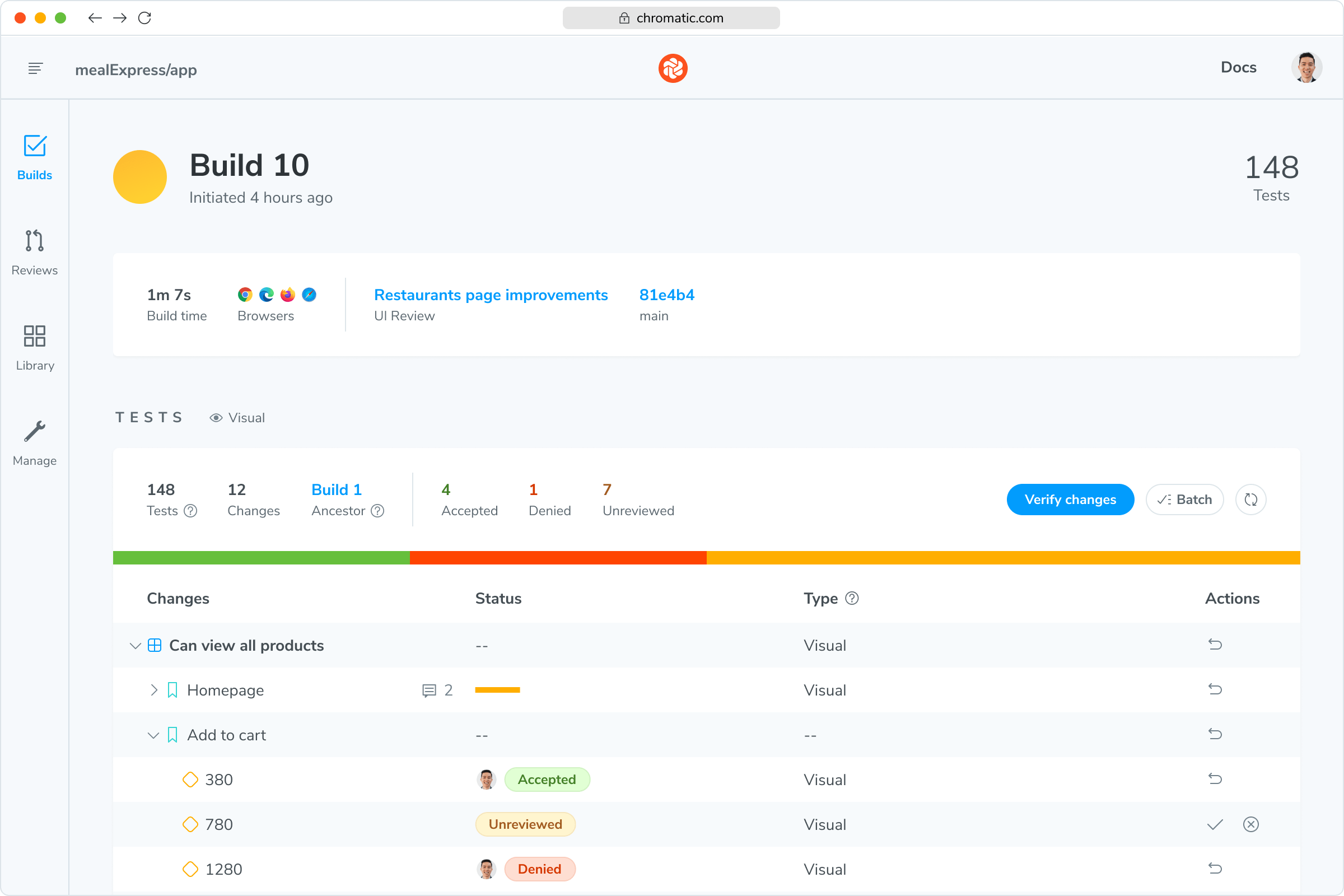
A Chromatic build listing visual changes ready for review
Triage large test runs quickly
New snapshots, visual changes, and errors are ready in the browser. Use keyboard shortcuts to move through the run without downloading and matching screenshot files from CI.
Accept or deny visual changes
Accept an intentional change to update its baseline, or deny a regression to keep the existing baseline and fail the build. No need for the separate Vitest run with --update.
Built into Git and CI
Run Chromatic in your existing CI workflow to add a UI Tests check to each pull request. Make the check required in your Git provider to block merges until the build passes.

Reproduce any snapshot in your browser

Chromatic saves the rendered UI behind the image so you can investigate pixels and code side-by-side.
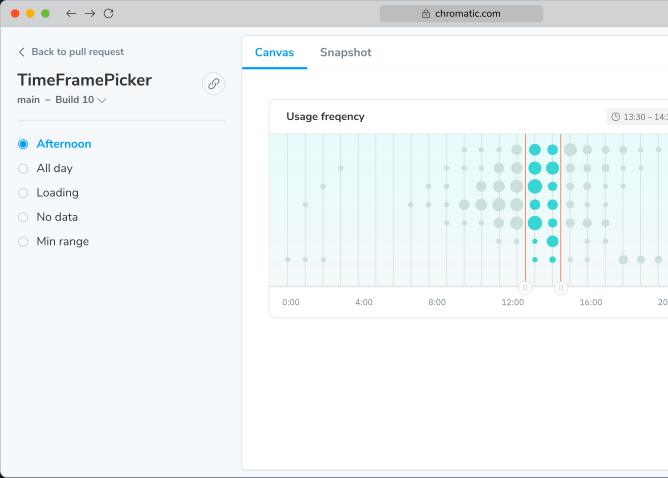
Reproducing a snapshot in the browser
Pick up where CI left off
Open the captured UI from a failed build and continue debugging in your browser after the CI job ends. No rerunning Vitest to recreate the failure.
See the DOM behind the diff
Inspect elements, computed styles, and layout in devtools instead of reasoning from changed pixels alone.
Share a link to the snapshot
Teammates can inspect the same captured UI in their own browser without checking out the branch or rerunning Vitest.
Never fix the same visual bug twice.

Frequently asked questions

“Time is money and Chromatic saves us at least 24 hours of manual review time every month.”
Paul Vidal
Paul Vidal
CTO
Collective